 Voortware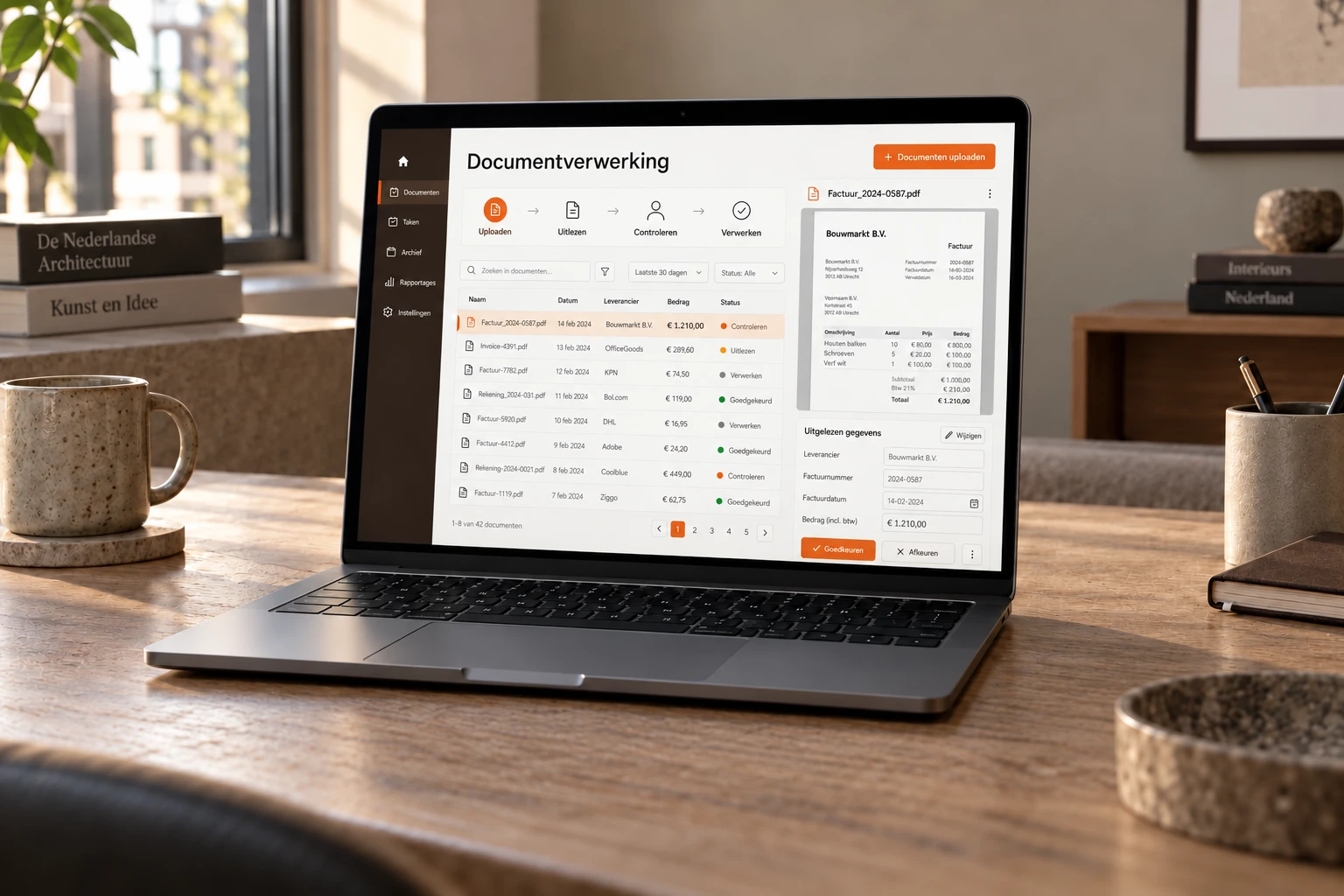
In many businesses someone spends hours every week retyping invoices, orders and forms. Supplier, invoice number, amount, VAT, line by line into the accounting package. The work isn't hard, but it never stops, and every typo resurfaces later as a discrepancy someone has to track down.
Automating document processing means software takes over that reading and typing. This article explains how it works, which documents are suitable, when a standard tool is enough and when custom pays off, and where the pitfalls are.
What automating document processing actually is
It comes down to three steps. A document comes in, the data is extracted, and that data ends up in the right place. The difference between solutions lies mainly in the middle step: how the data is extracted.
OCR: reading characters in fixed places
Classic OCR turns a scan into text and picks out fields using a template: the invoice number is top right, the total at the bottom. That works well as long as documents always look the same. If a supplier changes their layout, or a new supplier comes along, someone has to set up a new template.
AI extraction: reading meaning
With AI extraction, a language model reads the document the way a person does. It understands that an amount is the total, wherever it sits and whatever it's called. That means it works on documents it has never seen before, and you don't have to maintain a template per sender. It can also pull data from the body of an email, not just from a PDF.
For a business with five regular suppliers that makes little difference. For a business working with dozens of parties that each send their own paperwork, it's the difference between a system that works and a system that constantly needs upkeep. More on the technology under AI document processing.
Which documents are suitable
Almost any document containing data that gets entered again somewhere else. The most common:
- Invoices. Purchase invoices are, for most SMEs, the flow where time is saved fastest: high volume, fixed fields and a clear destination in the accounts.
- Orders. Clients ordering by email, as a PDF or in the body of a message, each in their own format.
- Packing slips and delivery documents. Checking that what arrives matches what was ordered.
- Forms. Applications, intakes and registrations that now arrive on paper or as a scan.
- Files. Contracts, certificates and reports in which someone now searches for a date, an amount or a clause.
Photos count too. A rating plate on a machine, a receipt, a handwritten work order: as long as a person can read it, a model can usually do something with it, although confidence is clearly lower with handwriting.
Processing invoices automatically, step by step
Because invoices are the most common starting point, this is what such a flow looks like.
- Intake. Invoices arrive in one place: a dedicated email address, an upload screen or a folder the system watches.
- Extraction. Supplier, invoice number, date, line items, VAT and total are extracted, even from a layout the system hasn't seen before.
- Recalculation. The lines must add up to the total and the VAT amount must be right. Anything that doesn't add up doesn't go through automatically.
- Review. Every field gets a confidence score. Doubtful cases land in a review screen where someone confirms or corrects them in seconds.
- Integration. The approved invoice goes to your accounting software with the original document, the right ledger account and cost centre.
- Archive. The original stays findable by supplier, amount or period, without anyone creating folders.
The same pattern works for orders and forms, just with a different destination: your CRM, your ERP or your planning.
Why the human stays in the loop
One hundred percent accuracy doesn't exist. Not for software, and not for the employee who retypes today. The question isn't whether mistakes happen, but what happens when the system is in doubt.
A system that pushes through everything it thinks it read just moves the problem: the mistakes end up in your accounts instead of on your desk. A good system knows when it isn't sure and puts those cases in front of a person. Amounts are recalculated, and anything that doesn't add up always goes to someone.
Automate the volume, not the judgement. The system does the reading and typing, your team decides on the exceptions.
In practice that means: at first someone reviews more, and as you see where the system is reliable, you adjust the threshold. You set that threshold, not the supplier.
Standard tool or custom build?
There are good standard tools for document processing, such as Klippa and Parseur. You send documents or emails to them, the tool extracts the data, and you collect it through an export or an integration. For many businesses that's exactly enough.
A standard tool fits if
- you mainly process invoices or receipts in a format the tool knows well;
- the tool has a ready-made integration with your accounting package;
- the process after extraction is simple: data in, done;
- your volume is limited and a subscription works out cheaper than a build.
Custom fits if
- the documents are sector-specific and a standard tool doesn't read them well;
- the data follows its own route after extraction, such as checking against an order, a price agreement or stock;
- it has to connect to a system for which no standard integration exists;
- documents arrive from many directions: as attachments, as photos and as text in an email.
There's also a middle route: a standard tool for extraction, with a custom integration or workflow automation behind it. That's often the cheapest option, and when it is, we say so.
When it pays off
As a rule of thumb: a build only pays for itself in reasonable time from a few hundred documents a month. Below that, it rarely does. Retyping two invoices a week takes fifteen minutes, and then a standard tool or simply carrying on is the better choice.
It can pay off sooner if there's a deadline attached, or if a mistake further down the line is expensive. A wrongly copied amount on an order, or a missed certificate in a file, costs more than the retyping itself.
Work it out for your own situation: number of documents per month, times the minutes per document, times the hourly cost of whoever does it. A worked example, not a promise: two hundred invoices a month at three minutes each is ten hours a month, well over a hundred hours a year. Add the rework for mistakes discovered further down the line. Set the costs against that. At Voortware a build starts at € 9,500 with a fixed price up front, and the discovery session in which we walk through your document flow is free.
Connecting to your accounting or CRM
Extraction is half the work. The data also has to go somewhere. Dutch accounting packages such as Exact, Twinfield and e-Boekhouden have usable APIs, as do most CRM and ERP packages. The better the API, the cheaper the integration.
Check up front what your package supports. If it can't receive attachments via its API, or the vendor charges extra per integration, you want to know before you start. See also how we connect systems.
What about GDPR?
Documents contain personal data: names, addresses, sometimes bank account numbers or health information. That calls for a few agreements up front.
- Where are documents stored, and for how long?
- Which parties process the data, including the provider of the AI model, and is it used to train models?
- Is there a data processing agreement with every party that processes data?
- Who has access to the review screen and the archive?
With a standard tool, the answers are in the vendor's terms. With a custom build, you agree them yourself. With us, the data stays in your environment, isn't used to train models, and we sign a data processing agreement on request.
Three mistakes we often see
- Wanting to do all documents at once. Getting one flow properly live delivers more than five flows half done. Start where the volume is and expand from there.
- Testing only with tidy examples. A system that works on the ten neatest invoices says little. The skewed scan, the two-page invoice and the credit note are the real test.
- Forgetting the steps that follow. If the data still has to be entered by hand into three systems after extraction, you've only moved the retyping. Look at the whole route, from intake to booking.
None of these mistakes is technical. They're about scoping, and you do that together with the people who do the work now. They know which supplier always deviates and which documents never arrive complete.
Where to start
Pick one document flow: the one with the most volume or the most expensive mistakes. Usually that's purchase invoices. Collect a stack of examples, including the awkward ones: the skewed scan, the supplier with the odd format. Count how many there are per month and how much time they take.
With those three things, examples, volume and time, you'll know within one conversation whether it pays off and whether a standard tool is enough. How we build it is on the page about AI document processing.