 Voortware
One trigger starts the process.
A form, email or status change starts the agreed sequence of actions.
Workflow automation
Forwarding requests, copying details, sending reminders. We automate the repeatable steps between your systems so your team can focus on the work that needs attention.
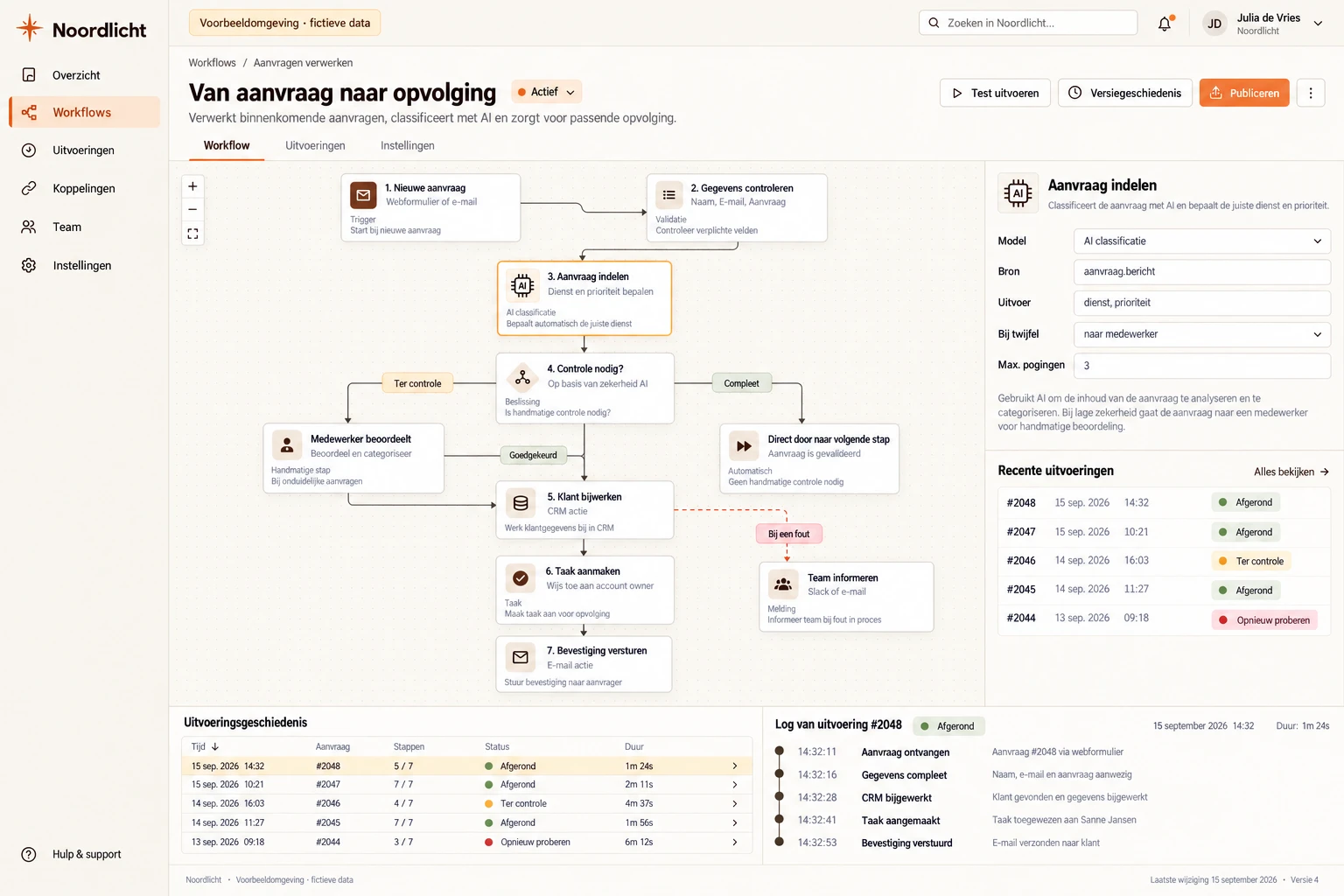
Illustrative example. Your version follows your workflow.
Built around your work
A form, email or status change starts the agreed sequence of actions.
Details go to the right system and the right colleague receives a task or notification.
Anything that cannot follow the agreed rules is passed to a team member.
In practice
After a form, email or status change, data is processed, tasks are created and notifications are sent.
Recurring work runs automatically through your process.
We start with your process, not the technology. For serious projects we build a free prototype upfront.
Example workflow
When it makes sense
Workflow automation for SMEs means replacing repetitive manual work — forwarding documents, chasing follow-ups, updating systems — with software that runs it automatically. Typically 5 to 20 hours per week back for your team, without losing control over exceptions.
Voortware builds custom workflow automation from Amsterdam. From document processing to notification flows and API integrations with your CRM or accounting system. With built-in logging and error handling so it stays reliable — even when something goes wrong.
The price depends on the steps, decision rules and systems we connect. We agree a fixed price before starting. Want to know which processes qualify first? Read workflow automation for SMEs: when does it make sense?
Software that takes over recurring steps in your work. An event, such as a submitted form, an incoming email or a status change, automatically triggers the next steps: copying data into the right system, creating a task for a colleague or sending a notification to a client.
Processes that happen often, run the same way every time and are manual today: forwarding requests, processing invoices, following up with clients or retyping data between systems. Start with the process that has the most volume, not the most complicated one.
A build project starts at € 9,500, with a fixed price agreed up front. The price depends on the number of steps, the decision rules and the systems we connect. The discovery in which we decide what to automate first is free.
For simple automations with low volume, Zapier and Make are fine and we will recommend them. Custom pays off when decision rules are involved, when volume drives up per-task costs, or when an error must never go unnoticed.
Then it goes to a person. We agree up front which cases may run automatically and which may not. Anything outside that goes to a team member with the right context. Every step is logged, so you can see what happened.
A first working version is ready in four to eight weeks on average. We start with one process, take it live and then extend to the next.
Bring a request, a spreadsheet or a process that takes too much time. We'll explore what would help and whether custom software is the right fit.
Book an introduction